

Live Dashboards
How Live Dashboards turn a plain-language request into a versioned, permission-aware dashboard that refreshes without a model.
InferEdge's Live Dashboards is a domain-agnostic framework that turns a request in plain language into a working, shareable application. Users describe what they need and can attach reference files. Agents fetch the data, write the analysis and build the dashboard. Once it is published, each refresh re-runs the same queries and calculations on fresh data, with no model involved, so the numbers update and the methodology does not. Viewers filter and slice the data, run scenarios, export results and ask follow-up questions in chat.
Features
A dashboard combines data sources, application features and chat over the published data.
Configurable data sources
- InferEdge's MCP tools
- External data connectors and APIs
- Client internal data
- Static Excel files and documents
Application features
- Filters - Slice the data by any control the dashboard exposes.
- Live data - Fresh data on open or on demand, scheduled refresh, and streaming sources that push updates as they arrive.
- Shareable views - The link carries the current filters, so a colleague opens the same view.
- Alerts - Users pick the tickers they care about and set price thresholds.
- Scheduled delivery - A daily email with the dashboard attached as a PDF.
- Sharing - Share by email, add collaborators who can edit, and revoke access at any time.
- Write actions - A dashboard can update a watchlist or another record, with the user confirming each action.
- Documents - Export to PDF, Word, Excel or PowerPoint.
Chat on the dashboard
- Ask follow-up questions about the data on screen
- Synthesis - Written around the user’s views and thinking model.
- Extract structured data and trends from documents
Architecture
The framework has two paths:
- Build path - Agents create, check and publish the dashboard.
- Run path - The published dashboard runs in a sandboxed browser frame and re-runs its saved queries, with no model call.
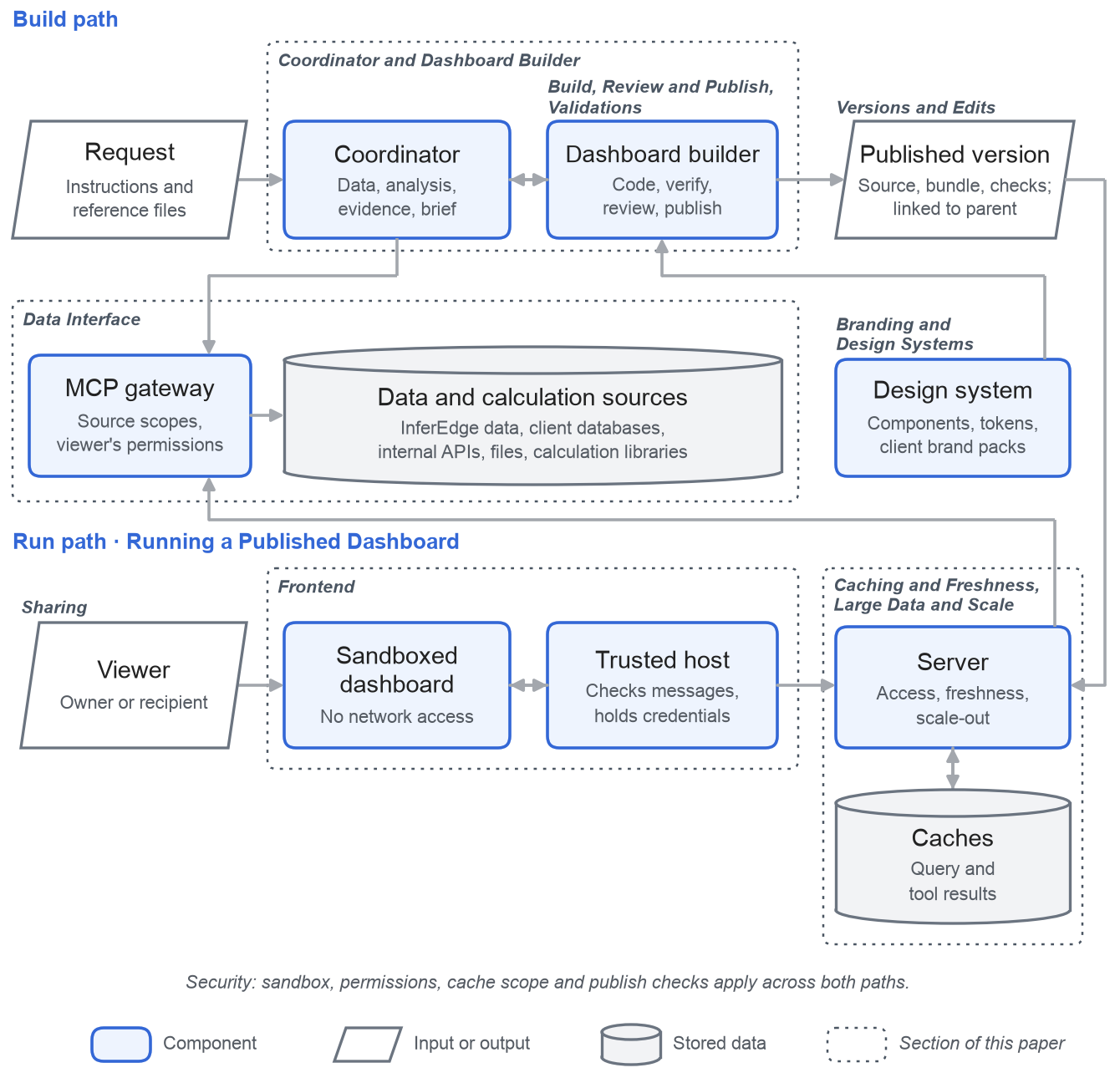
Data Interface
Every data source reaches a dashboard as an MCP tool behind one gateway: InferEdge data, a client's database, an internal API or a calculation library. When it publishes, the agent declares the tools the dashboard reads from and the actions it can write to. Both lists are stored with the version, along with each tool's input schema.
At runtime the server checks every call against that list. A tool that wasn't declared is refused, and so is a tool whose schema has changed since the dashboard was published, so a change upstream shows up as an error rather than as wrong numbers.
Each query plan fixes the calls, their order, and how results are paged and fanned out in batches. Every call runs under the viewer’s own permissions. A plan returns all of its data or an error, never a partial result, and a viewer without access to a source sees an error on the panels that depend on it.
The table lists the sources a dashboard can use.
| Source type | Examples |
|---|---|
| InferEdge data | Equities, bonds, mutual funds, indices, FX, commodities, news, filings, ratings, research documents |
| Client databases and warehouses | Postgres, SQL Server, Snowflake, BigQuery, Databricks |
| Internal APIs and business systems | Client systems, CRM (Salesforce), ERP (SAP) |
| Files | Excel, CSV, PDF and Word uploads |
| Third-party data vendors | Market or alternative data under the client's own licence |
| Calculation services | inferlib analytics; a client's own models or libraries |
Coordinator and Dashboard Builder
Two agents build each dashboard: a coordinator and a builder.
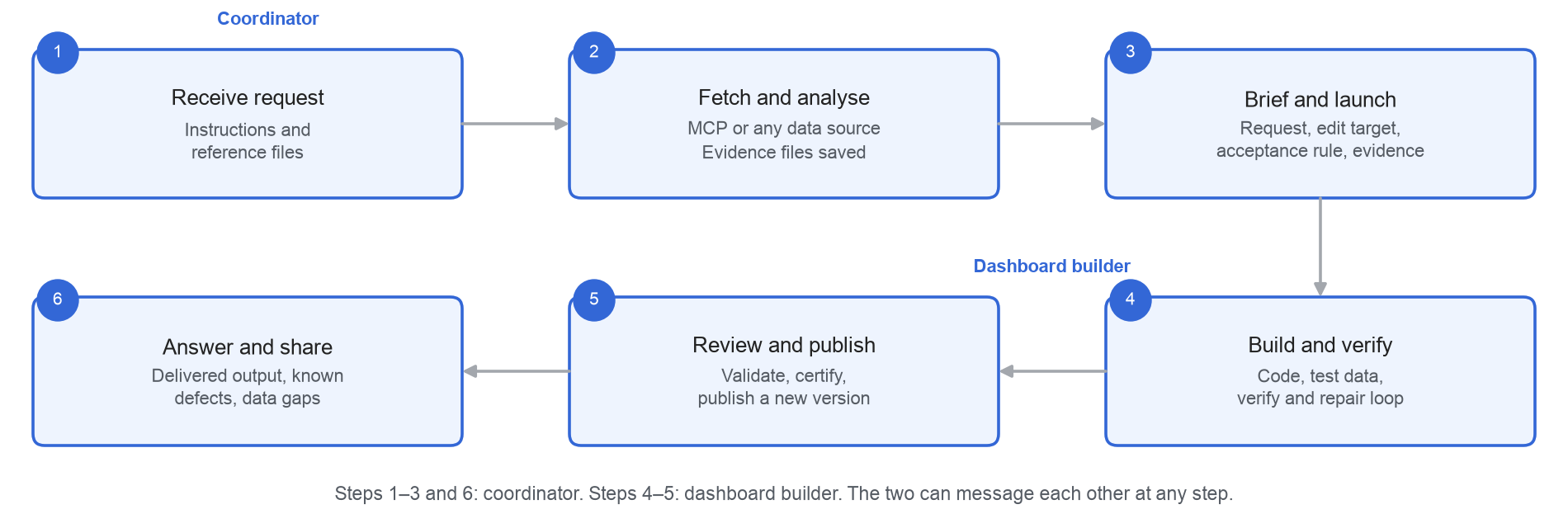
The coordinator is the agent the user chats with. It reads the request and any reference files, calls the data tools it needs, and saves every response as an evidence file. It then writes a brief for the builder: the request, the plan, the acceptance criteria and the paths to the evidence. The two message each other while the build runs; the builder reports progress and asks when something in the brief is unclear.
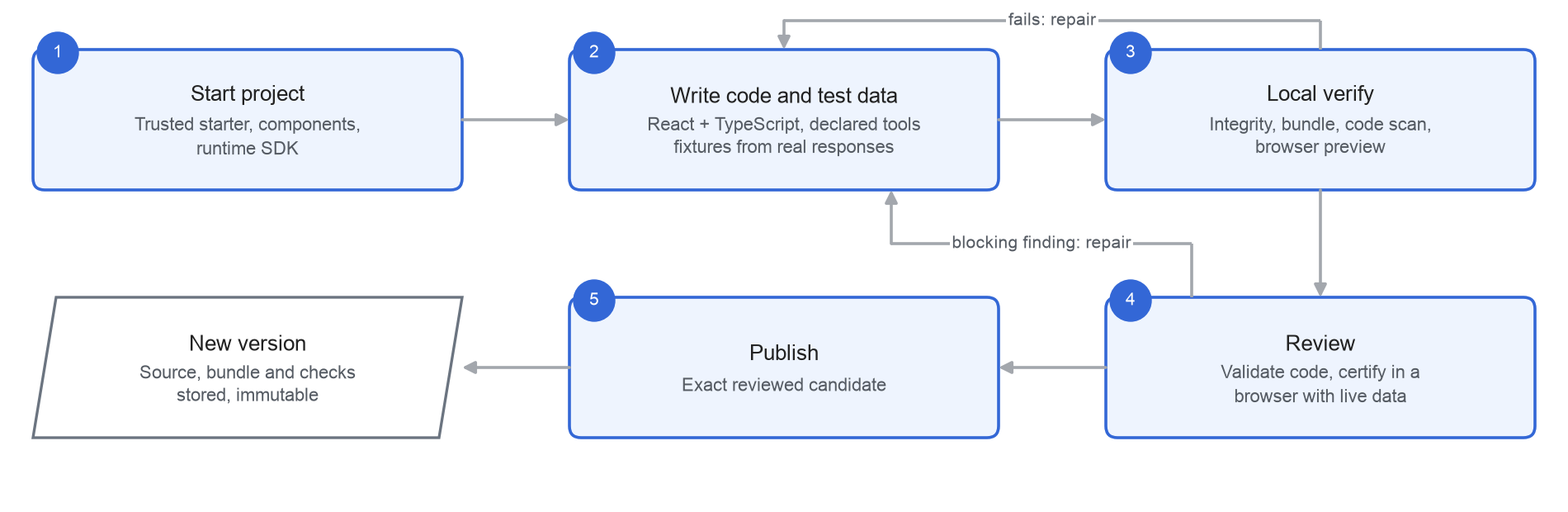
The builder writes the dashboard in TypeScript and React. It starts from a trusted starter project and builds only from the design system's approved components, about a hundred of them: tables, charts, cards, controls and layouts. Every data query in the code names a declared tool. Calculations go in their own modules and can call inferlib or a client's libraries.
The builder tests against fixtures made from the evidence files, which are real responses the coordinator fetched, and runs four checks of its own before submitting: source integrity, bundle, code scan and a browser preview.
The diagram shows the builder's loop, from starting the project to publishing a version.
We keep the builder separate from the coordinator because:
- Clean context - Build logs, errors and repairs stay with the builder. The coordinator’s context holds the request and the evidence.
- Responsive chat - The builder runs in the background, so the coordinator can answer the user or fetch more data.
- Right model per job - Each agent runs on the model and reasoning effort that suits its work: understanding the request and judging results for the coordinator, the long build loop for the builder.
- Contained data - The builder has no data tools. It builds from the evidence the coordinator recorded, so every number in the build traces back to a recorded tool response.
- Faster edits - The builder can be resumed later with its project and decisions in context.
Review and Publish
When the builder submits, the server reviews the candidate in three stages:
- Build record - The submitted source and bundle must match what the builder's own checks passed.
- Source scan - The code is scanned for anything the sandbox forbids, and every tool it calls must be declared.
- Live certification - The bundle runs in a headless browser against live data, under the requesting user's permissions. The first data load must succeed and the page must render without errors.
Each problem comes back to the builder as a finding with a code, such as tool.undeclared, live.initial_tool_failed or browser.runtime_error. Security and functional findings block the publish; others are advisory. The builder fixes them and resubmits. What gets published is the exact candidate that passed review.
If a criterion from the brief can't be met, for example because the source doesn't publish a field, the dashboard is published with the gap listed as a known defect, and the coordinator tells the user what is missing.
Validations
Validation runs in two layers. Platform checks confirm the dashboard is safe and works. Data checks confirm the numbers are right.
Data checks sit at three levels:
- Raw data - Completeness against the source, such as rows returned against the source's own total, and coverage when a query fans out across many instruments. A dashboard sets a minimum coverage, and a refresh that falls below it is flagged on screen.
- Calculation - Reconciliations, such as holdings that sum to the reported AUM, or contributions that sum to the portfolio return.
- Presentation - What is shown matches what was calculated, in the right units and as of the right date.
Users can define checks, and the agents infer their own from the request. These checks run on every refresh, not only at publish.
A dashboard can also carry an eval set that runs before every new version is published, so an edit can't quietly break what an earlier version got right.
Technical Aspects
Running a Published Dashboard
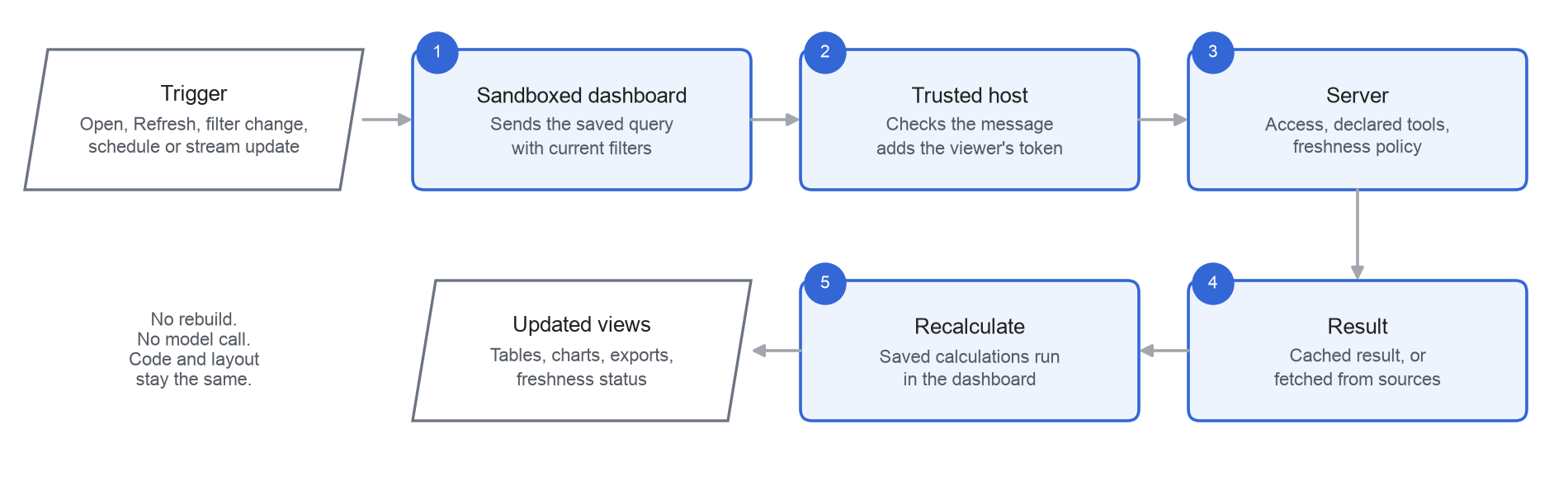
A refresh does not rebuild the dashboard or call a model. It re-runs the saved queries and calculations.
- Triggers - Opening the dashboard, changing a filter, clicking refresh, a schedule, or an update from a streaming source.
- Where the work runs - The server runs the query plan and returns the data. The dashboard's calculations then run in the browser, on that data.
- What updates - The data is updated, along with every calculation, table, chart and export that depends on it, for the filters currently applied.
- Freshness - Each query goes to the live source, or to a cached result when the freshness policy allows. The page shows how old the data is.
- Streaming - Streaming sources can push updates. The host holds the subscription and passes each update into the sandboxed frame.
- Alerts and scheduled delivery - A scheduler runs the same saved queries on the server, under the subscriber's permissions. Alerts fire when a value crosses a threshold; digests are rendered and delivered on their schedule.
- What stays the same - The code, layout and methodology stay the same. They change only through an edit, which creates a new version.
Frontend Environment
Each dashboard runs in a sandboxed frame inside the InferEdge app. The frame has no network access, so it can only send messages to the host. The host attaches a fresh nonce to each frame and accepts a message only if it carries that nonce and names the right dashboard and version. It then passes queries to the server, and access is limited to each client's and user's permissions.
Caching and Freshness
Repeat requests are served from cache instead of going back to the source. There are three cache layers: whole-query results on the server, individual tool results on the server, and a copy in the viewer's browser.
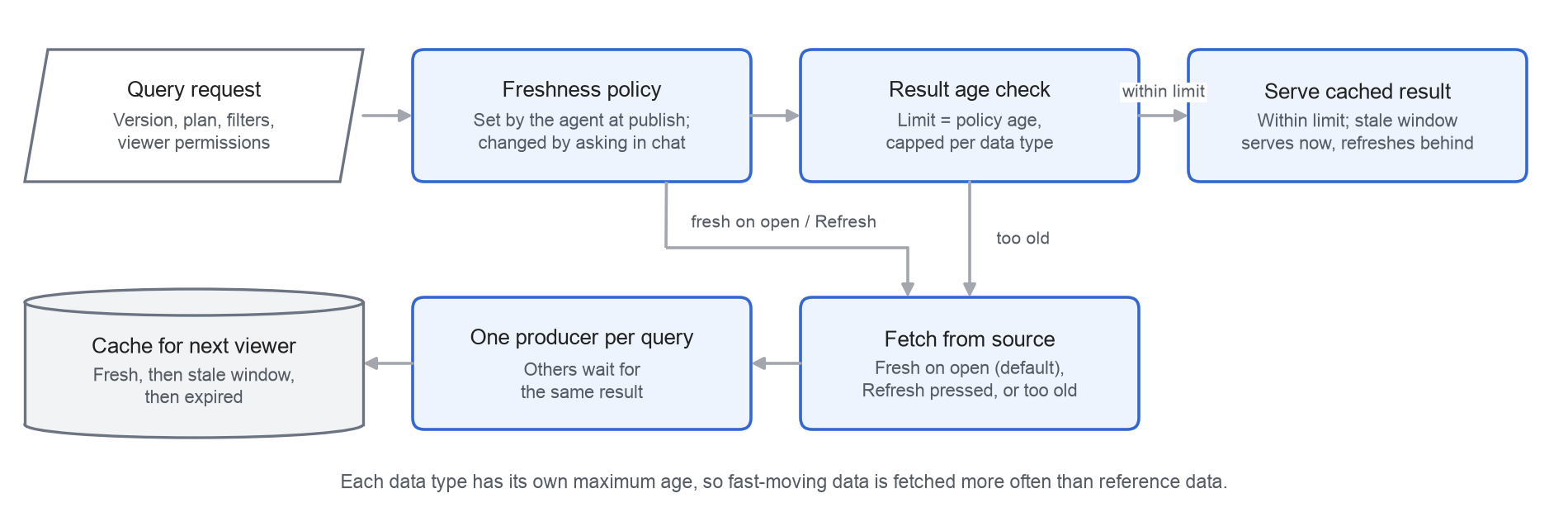
- Freshness policy - The agent proposes one when it publishes, and the owner can change it by asking in chat. The default is fresh data on open. An edit keeps the policy of the version it started from.
- Maximum age by data type - Quotes, trades and screener results are reused for up to 15 seconds, news and document search for 30 minutes, and reference data for 24 hours.
- Stale window - A dashboard set to cached mode can show a recent result at once and refresh it in the background.
- One producer per query - When several viewers ask for the same data at once, one request fetches it and the rest wait for that result, so the source is called once.
- Failed refresh - The previous result stays on screen, marked as older data, and the page shows that the update failed.
- Browser copy - Kept per user, for up to 24 hours, and cleared on logout.
Large Data and Scale
Heavy work happens at the source and on the server. The browser receives results, not raw rows.
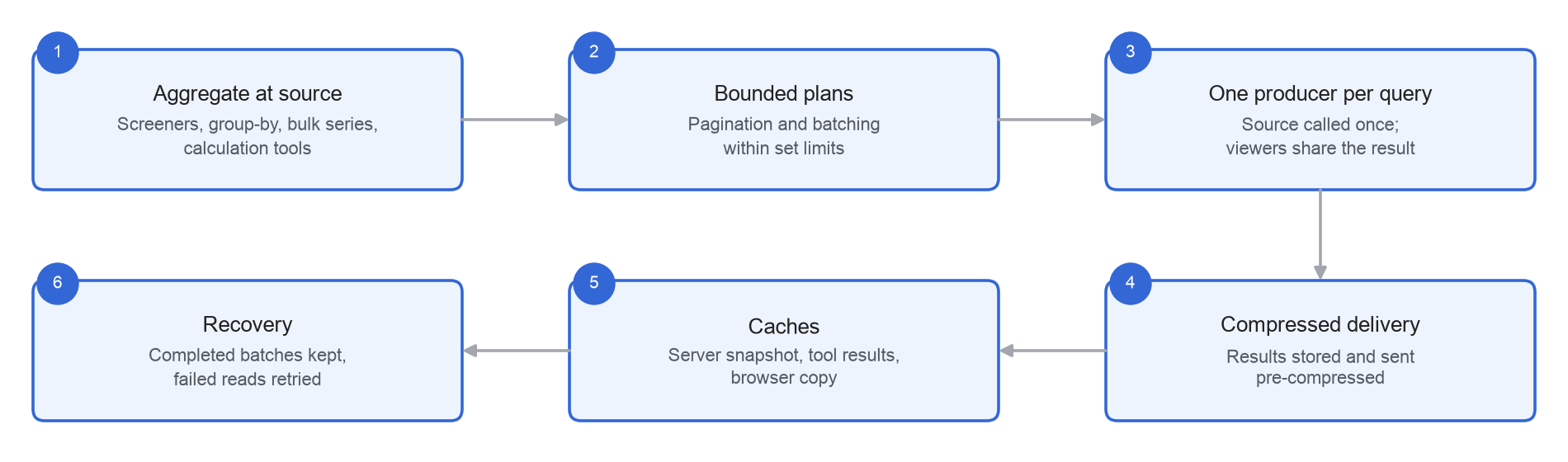
- Aggregation at source - Screeners, group-bys, bulk series and calculation tools return summaries rather than rows.
- Bounded plans - A query plan can make up to 300 tool calls, read up to 100 pages from a paginated source and fan out in batches of up to 500 items. Reads run four at a time.
- Many viewers - With one producer per query and shared caches, the source is called once, and other viewers reuse the result.
- Compressed delivery - Results are stored and sent compressed, up to 32 MiB per response.
- Server load - Each server process admits a fixed number of plans at once. Beyond that it returns a short busy response, which the host retries, rather than slowing down for everyone. Server pods scale out with load.
- Build load - Build workers scale on the length of the build queue.
- Recovery - Each read is retried on a transport error. When a fan-out has failures, only the failed items are fetched again.
Security
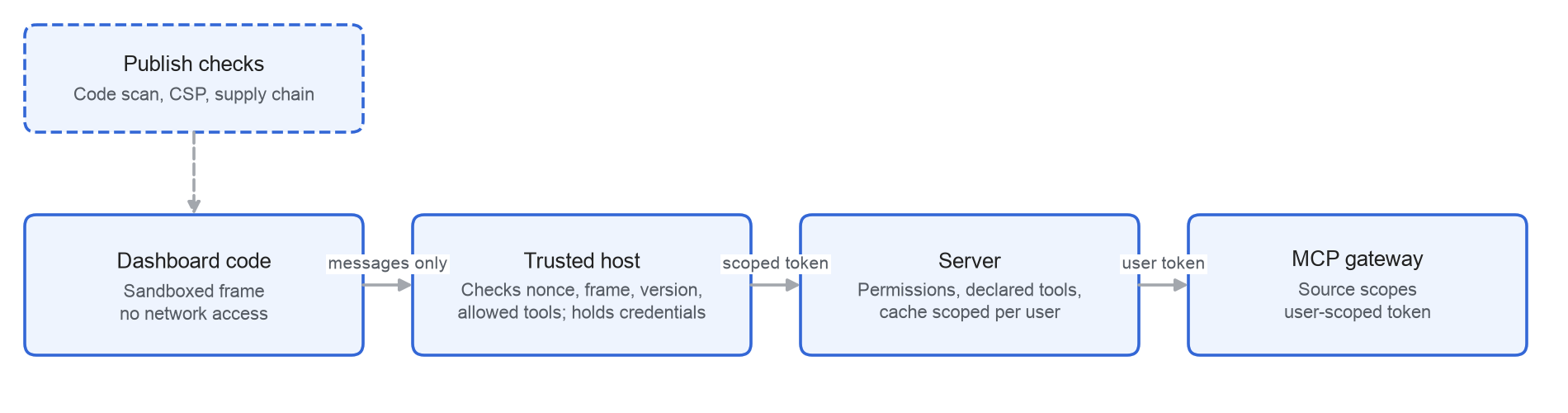
- Isolation - Generated code runs in a sandboxed frame with no network access. A content security policy blocks all outbound connections, and credentials stay with the host.
- Messages - The frame can only send messages to the host, which checks the nonce, the dashboard and the version on every message.
- Access - The server exchanges the viewer's login for a token addressed to the MCP gateway, and checks the viewer's permissions and the version's allowed tools and their schemas before any query or cache reuse.
- Cache scope - A cached result is reused only for a viewer with the same permissions. If the cache is unavailable, the server reads from the source under the viewer's own token.
- Content - Served content carries a sandbox CSP header. Its hash is checked on every read, and a mismatch is refused.
- Writes - Queries only read data. A write action is prepared on the server, shown to the user with its arguments, and runs only after the signed-in user's confirmation in the host. It runs at most once, is recorded and is never retried automatically.
- Publish checks - A code scan blocks network APIs, eval, workers, navigation, unsafe HTML, inline event handlers, and external or computed imports. The starter project is pinned file by file to SHA-256 hashes, and packages install offline from a locked file.
Versions and Edits
- Versions - Every publish creates an immutable version linked to its parent. A version stores the source and bundle with their hashes, the allowed tools, their schemas and the review results.
- Stale edits - An edit names the version it starts from. If a newer version exists, the edit is rejected.
- Carried forward - The title and freshness policy stay as they were unless the edit changes them.
- Documents - Word, Excel, PowerPoint and PDF outputs use the same version history.
Edits are faster than first builds because little starts from scratch:
- The published source is restored and its hashes checked before the agents start.
- The builder from the earlier turn can be resumed with the project and decisions in context.
- Data is usually already available, so the framework fetches only what the change needs.
- Repeat builds skip the package install when nothing has changed, and reuse the bundle when the source hasn't changed.
Measured across the dashboards built so far, the median edit takes about 4 minutes and the median first build about 7.
Sharing
The owner shares a dashboard by email and can revoke access at any time. Recipients always open the latest version, and every query runs under their own data permissions. Recipients can view, refresh and forward it; each person it is forwarded to gets their own access. Collaborators the owner adds can also edit it. Dashboards can be embedded in client portals, inside the same sandbox.
UI Consistency
Dashboards and documents are built from a design system, so taking on a client's design system is a configuration rather than a rebuild.
- Dashboards - Built only from supplied components (tables, charts, cards, controls and layouts) and styled by design tokens in two layers: a brand layer and a semantic layer that the components use.
- Documents - The PDF, Word, PowerPoint, Excel and chart generators read one brand token set (colours, fonts, logo and chart palette).
- Client branding - Each client can have its own brand pack (colours, fonts, logo, chart palette and document templates), and its design tokens map onto the semantic layer, so the components stay the same and the look follows the client. An uploaded logo or supplied styling takes precedence over the default brand.
- Checks - Safety rules do not change. The brand pack is part of the version, and the review renders the dashboard with the client theme.
Comparison of Approaches
| Capability | Excel workflow | BI dashboard | Live Dashboard |
|---|---|---|---|
| Build from a request in plain language | ✗ | ✗ | ✓ |
| Change by asking in chat | ✗ | ✗ | ✓ |
| Time to first version | Hours to days | Days to weeks | Minutes |
| Connect client and third-party data | ○ Manual | ○ Connectors | ✓ MCP tools |
| Live data with visible freshness | ○ Manual refresh | ○ Scheduled refresh | ✓ |
| Interactive filters, views and exports | ✓ | ✓ | ✓ |
| Ask questions inside the dashboard | ✗ | ○ Add-on | ✓ |
| Each viewer sees data under their own permissions | ✗ | ✓ | ✓ |
| Every change versioned with source and checks | ✗ | ○ Version control setup | ✓ |
| Security checks before publishing | ✗ | ○ Admin review | ✓ |
| Calculation and reconciliation checks | ○ Manual | ○ Manual | ✓ Per request |
| Client branding | ○ Manual | ○ Themes | ✓ Brand packs |
✓ built-in ○ needs separate setup ✗ not supported
Updated about 2 hours ago